 HCPSS
HCPSSParents – Don’t Miss Important Messages!
September 16th, 2026
Ensure Your Contact Information Is Correct
With the school year underway, parents/guardians should be receiving regular communications that may come from various platforms. Families who have not completed FamilyFile this year are encouraged to check/update your contact information to ensure you receive all information from your child’s teachers, school and the district.
Reviewing Contact Information
Nearly all HCPSS messaging is sent to the email address and mobile number listed for each parent/guardian in Family File. Reviewing and resubmitting Family File each year is the first step to making sure your contact information is up to date and is available to receive messaging.
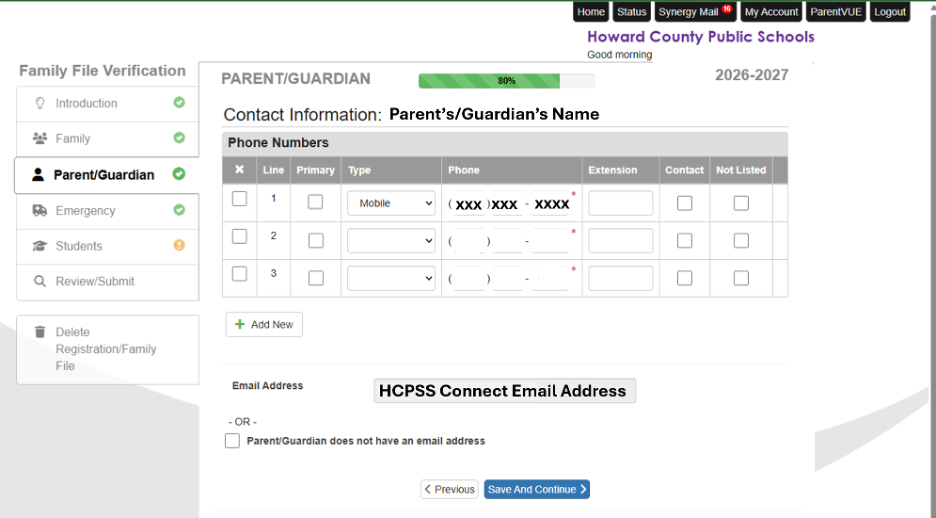
In the Parent/Guardian section of Family File, review the Contact Information page for each parent/guardian carefully. See the directions and image below for details.
- To receive HCPSS or school text messages (including emergency closing information) and/or receive texts or app messages from staff using TalkingPoints, make sure in the Phone Numbers grid a phone number is marked as Mobile in the Type column.
- *Each parent/guardian must have a unique mobile number.
- To ensure receipt of email communications, review the Email Address below the Phone Numbers grid. This is the primary email address for the parent/guardian and is used to login to HCPSS Connect. If this email address needs to be updated, contact your student’s school.
Emails
Parents/guardians may receive emails from their child’s teachers, school and district, including regular newsletters, priority news, and other information. Emails may come from various sources, including:
- Outlook – Direct emails from an HCPSS staff member that will come from an @hcpss.org email address.
- SchoolMessenger – District- or schoolwide messaging that will come from an @hcpss.org / broadcasts@schoolmessengermail.com email address. All parents/guardians are automatically enrolled to receive HCPSS and school emails, sent to the email address in Family File.
- Canvas – Teacher notifications that come from notifications@instructure.com. Parents/guardians can set Canvas notifications using these directions.
- Synergy – Non-classroom teacher notifications that come from hcpss_notifications@hcpss.org.
Text Messages
Parents/guardians may receive text messages from their child’s teachers, school and district, including emergency closings, and priority and additional information.
- SchoolMessenger – District- or schoolwide text messages sent to the mobile number in Family File. Both HCPSS and school texts come from the number 67587. Parents/guardians are encouraged to mark this as a known number or save as a contact to ensure texts are seen and not sent to spam.
- All users must opt in to text alerts from SchoolMessenger one time. If you are unsure if you have opted in, text the word “YES” to 67587.
- New! TalkingPoints – Teacher or school message received via text message or in the TalkingPoints mobile app.
- Requires that each parent/guardian have a unique mobile number listed in FamilyFile.
- Parents/Guardians will receive communications in the language on record in the HCPSS Connect Student Information System. Those using the mobile app, can set their own language preferences within the app. If you are using SMS text messages to send/receive TalkingPoints messages and want to change your receiving language, contact your child’s school to update the language in the parent/guardian record.
Please note! Unsubscribing from any school or district email or text (indicated as SchoolMessenger above) will unsubscribe a user from all future messaging, including emergency notifications.
If you have inadvertently unsubscribed or you have reason to believe you are not receiving regular messaging from any of the above services, please contact your school’s front office.